Ultimate Dugout DJ app icon - baseball with music waves

ULTIMATE
DUGOUT DJ

YOUR DIAMOND. YOUR SOUND.
HYPE THE CROWD. FIRE UP THE TEAM.

The ultimate sidekick for game day audio. Announce batters, trigger walk-up songs, and fire off event music with a single tap. Built for baseball, softball, and teeball.

8
Built-in Events
3
Playback Modes
iOS 17+
Required

Download on the App Store

Free to download. Pro features available.
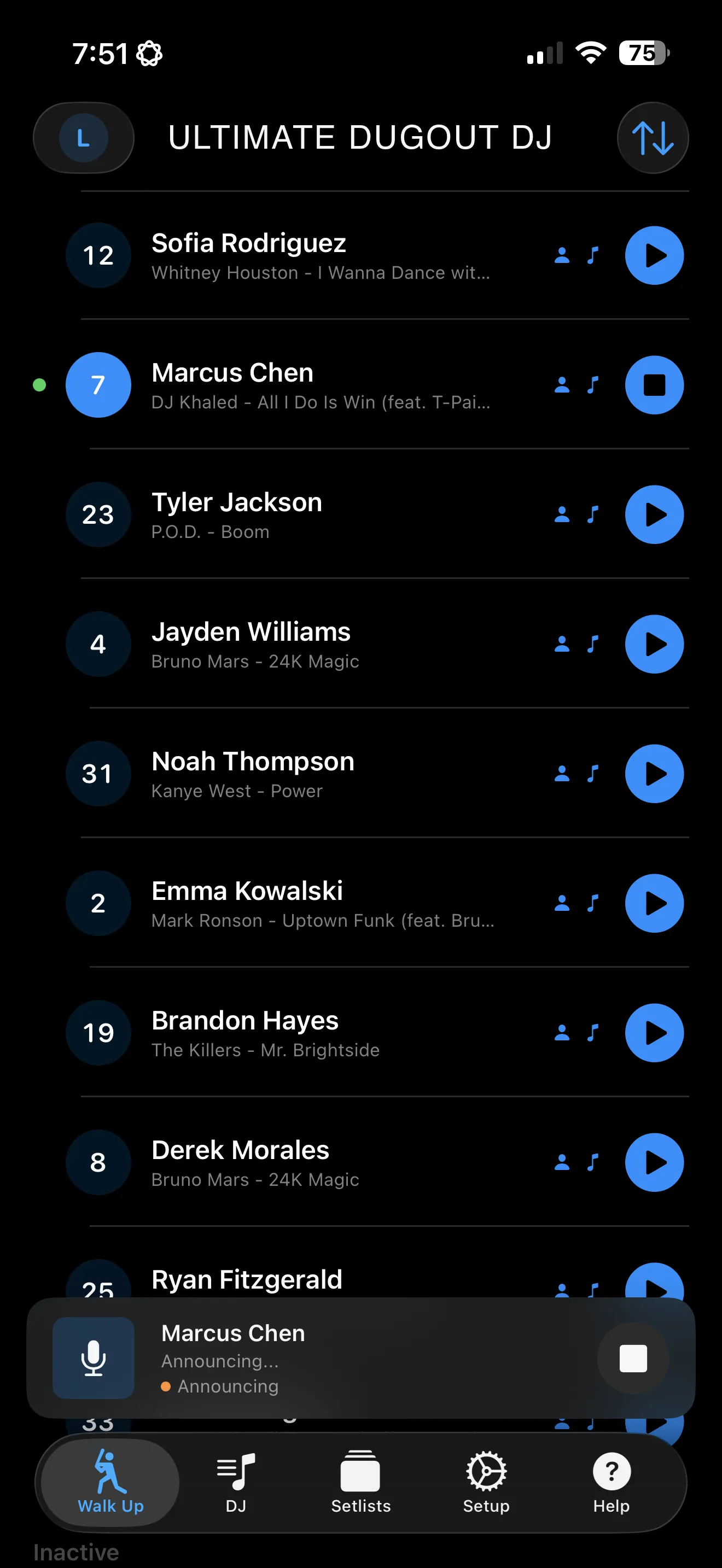
Ultimate Dugout DJ walk-up lineup showing batting order with player names and walk-up songs
🎶
🎷

WALK-UPS THAT BRING THE ENERGY

Every batter deserves their moment. Dugout DJ plays a full walk-up sequence for each player — announcement, number, and song — all with a single tap.

Walk-up lineup with batting order and player walk-up songs
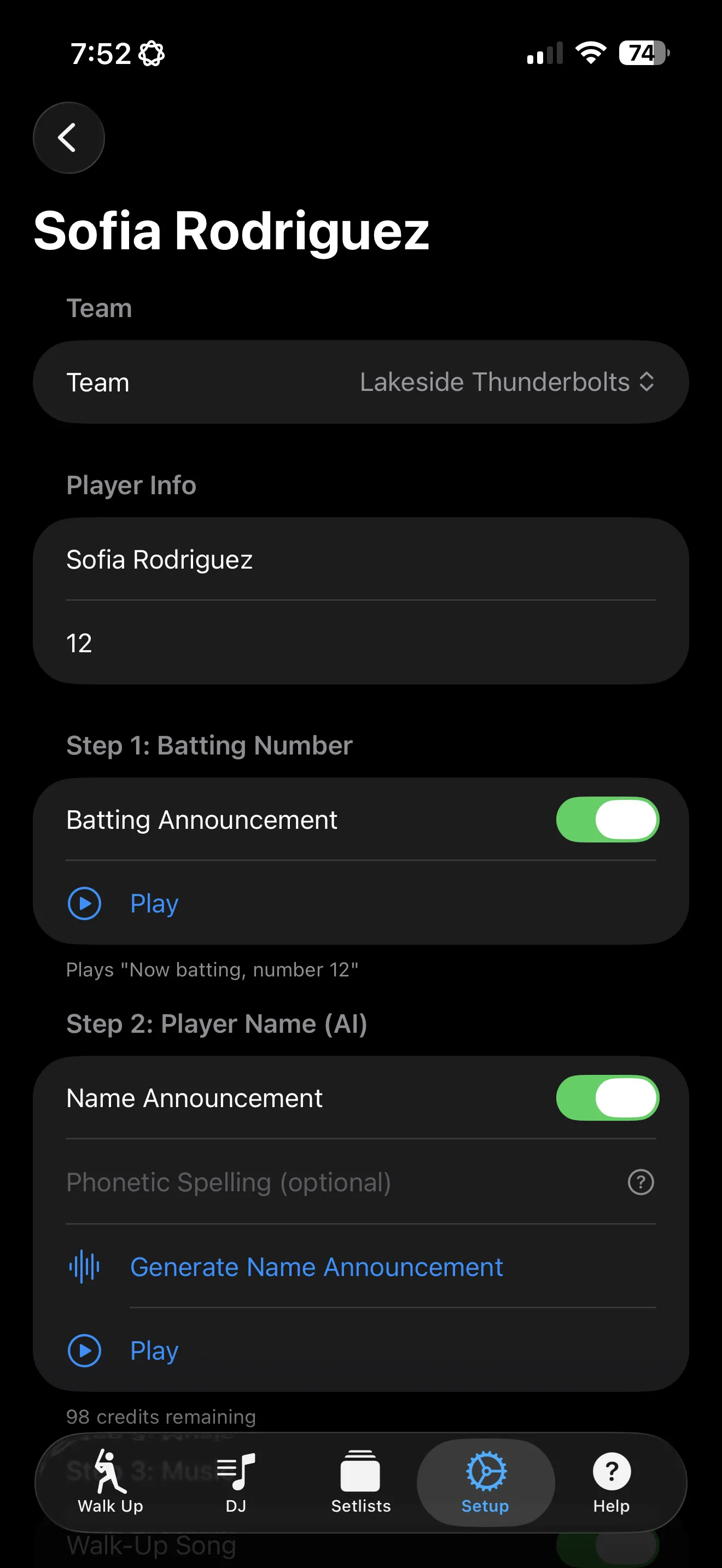
Player setup screen with name, number, and walk-up song assignment

THE WALK-UP SEQUENCE

1

Batting Announcement

"Now batting, number 7..."

2

AI Name Announcement PRO

A natural-sounding voice calls the player's name

3

Walk-Up Song

Their song plays automatically

Set a unique walk-up song for every player on the roster
Drag to reorder your batting lineup on the fly
Swipe to bench inactive players or mark the next batter on-deck
Auto-advance to the next batter after each walk-up
Per-player control over which parts of the sequence play

EVERY BIG MOMENT GETS ITS OWN SOUNDTRACK

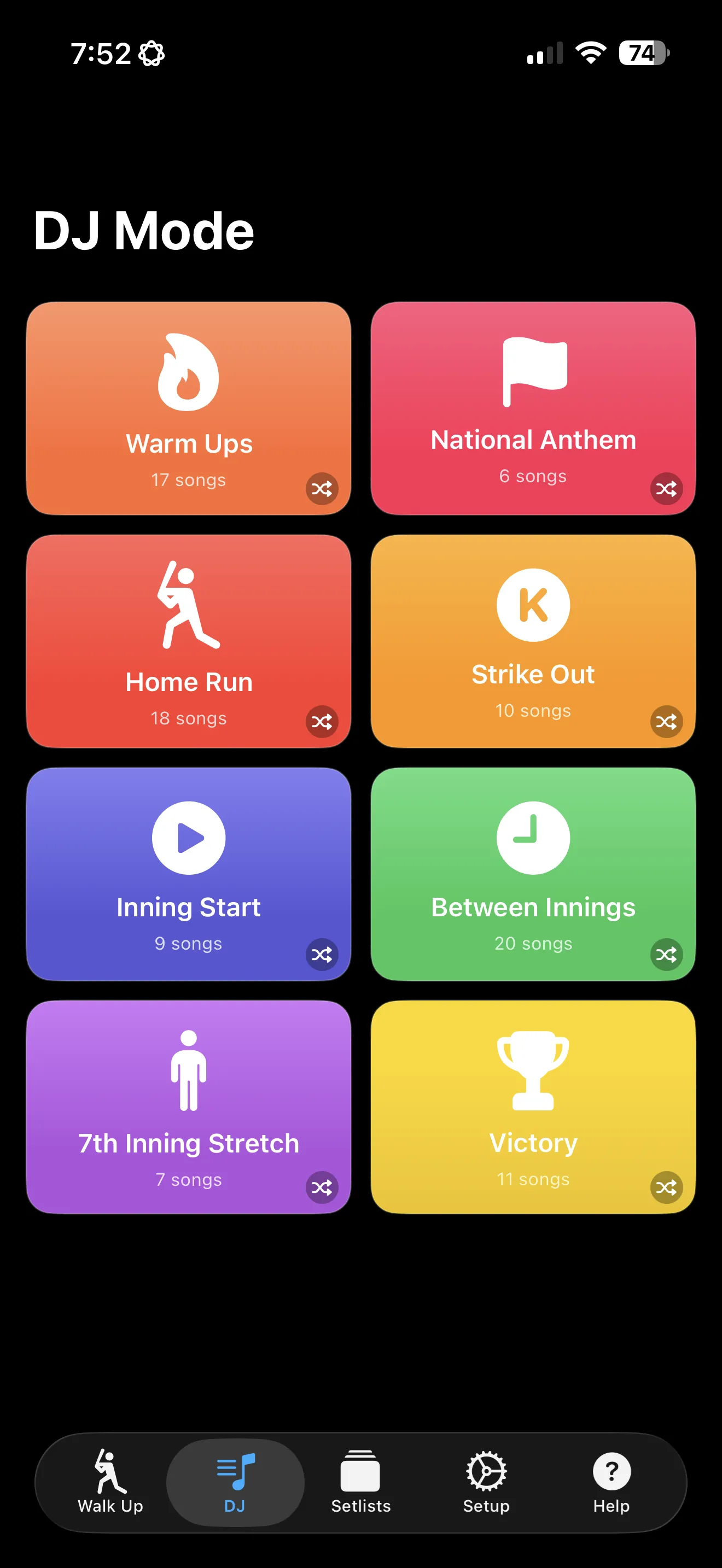
Home run? Strikeout? Seventh inning stretch? Tap the event, and the music plays instantly.

🎵 Warm Ups
🇺🇸 National Anthem
💥 Home Run
Strike Out
Inning Start
Between Innings
🎶 7th Inning Stretch
🏆 Victory

Pro users can create custom events with their own names, icons, and colors.

SEE IT IN ACTION

A walk-up lineup manager, powerful DJ console, and professional audio editing — all in your pocket.

Walk-up lineup showing batting order with drag-to-reorder and one-tap playback

WALK-UP LINEUP

Manage your batting order with drag-to-reorder. Tap to play the full walk-up sequence.

DJ console with large colorful event buttons for instant one-tap playback

DJ CONSOLE

Large, colorful event buttons for instant one-tap playback. Home runs, strikeouts, and every moment in between.

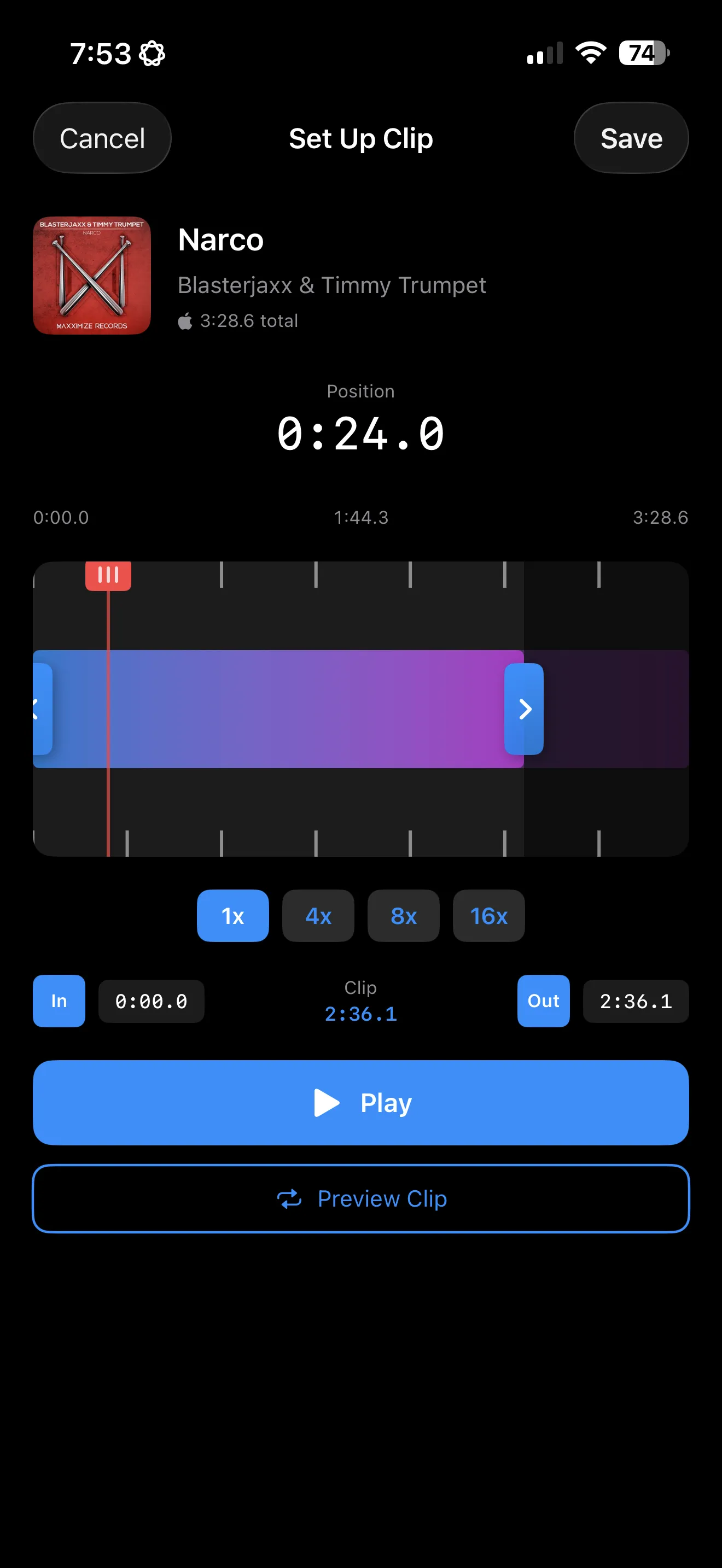
Clip editor with visual timeline for trimming songs and setting fade effects

CLIP EDITOR

Trim songs to the perfect moment with a visual timeline. Set fade-in and fade-out effects.

WATCH IT IN ACTION

Quick demos of Ultimate Dugout DJ in action on game day.

GAME-CHANGING FEATURES

Everything you need to run the soundtrack for any game, from teeball to varsity.

WALK-UP SEQUENCES

Announce the batter, call their name, and play their walk-up song — all in one tap. Auto-advances through your lineup.

PLAYER SETUP

Configure your team, set your batting lineup, and adjust on the fly mid-game. Drag to reorder, swipe to bench, tap to play.

SMART PLAYBACK

Shuffle never repeats until all songs play. In Order follows your sequence. Pick lets you choose each time.

YOUR MUSIC, YOUR WAY

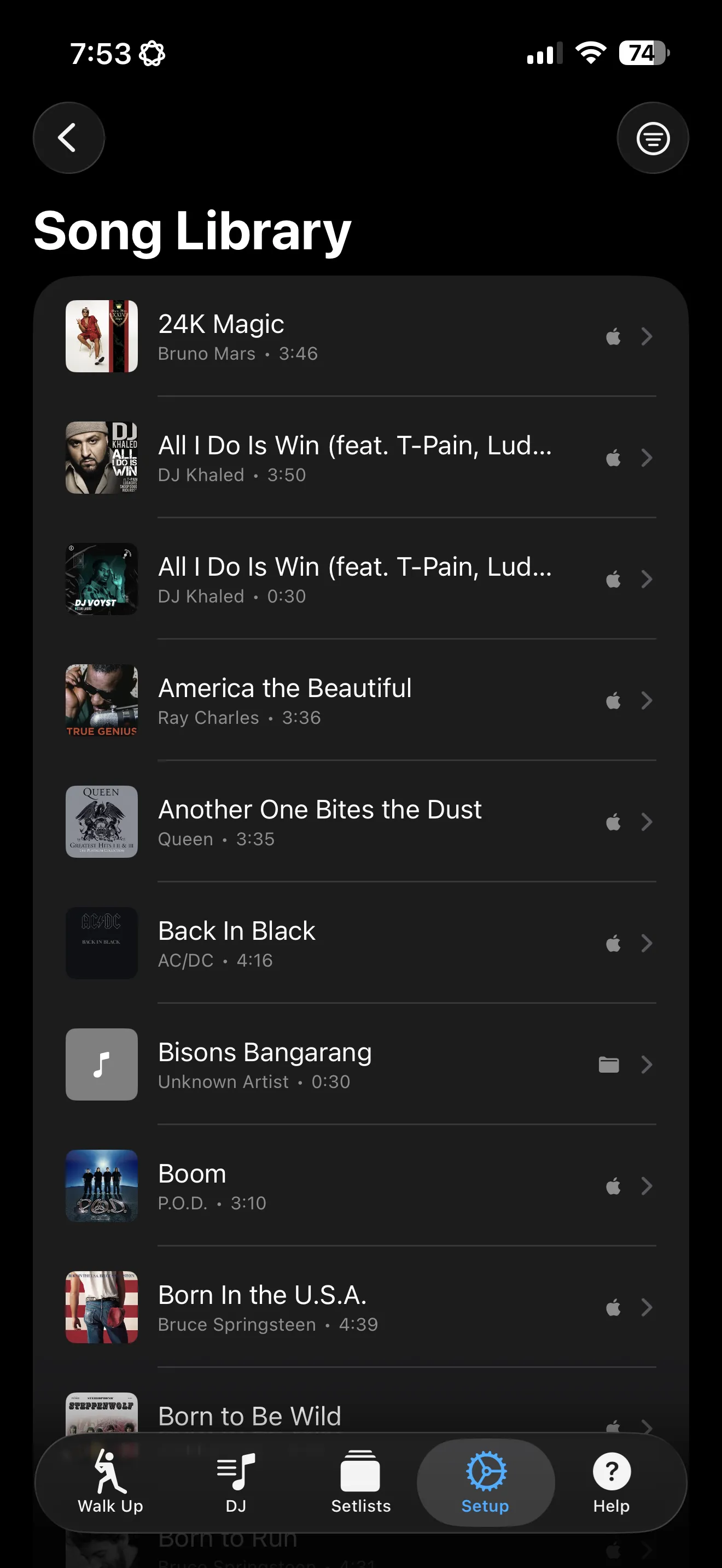
Search the Apple Music catalog or import MP3, AAC, WAV, and AIFF files. Bulk-import from your playlists.

PRO AUDIO EDITING

Visual waveform editor with pinch-to-zoom. Set start and end times and add fade effects for professional transitions.

ICLOUD SYNC

Your teams, players, songs, and setlists sync across all your devices automatically.

PRO FEATURE

THREE PRO ANNOUNCERS. ONE TAP.

Choose from Big Bill, Carlos, or Tommy to call your game. Each announcer delivers batting numbers with personality, then AI generates a natural-sounding call of each player's name.

Player setup showing announcer voice selection and AI name announcement options

DISTINCT VOICES

Three announcer voices with real personality. Pick the one that fits your ballpark vibe.

AI-GENERATED NAMES

Natural-sounding AI calls each player's name. Not robotic — sounds like a real announcer.

PHONETIC SUPPORT

Tricky names? Enter a phonetic spelling (Nguyen → "Win") and the AI nails it every time.

OFFLINE CACHING

Announcements are cached locally after first generation. Works at the field, even without Wi-Fi.

PRO FEATURE

SAVE YOUR SETUP. LOAD IT IN SECONDS.

Skip the pregame scramble. Save your entire game-day configuration as a setlist and load it with one tap. Different team? Different ball park? Different setlist.

🚀 New to DJ-ing? Start with a curated setlist and make it your own.

Curated setlists require an Apple Music subscription for playback.

Song library showing songs assigned to events and setlist management

INSTANT GAME-READY

No need to build from scratch. Load a curated setlist and you're ready to rock the diamond in under a minute.

CURATED THEMES

Stadium Classics, Hip Hop Hits, Rock Anthems, Kids Favorites — professionally curated with crowd-tested tracks.

SWAP IN SECONDS

Tournament weekend? Different league? One tap switches your entire setup. Save your own winning configs too.

ALWAYS GROWING

New setlists added regularly — seasonal themes, holiday vibes, and fresh collections to keep your sound evolving.

HOW IT WORKS

Four steps to game-day audio perfection

1

ADD YOUR ROSTER

Create your team, add players with names and numbers, and set the batting order.

2

ASSIGN WALK-UP SONGS

Pick a walk-up song for each player from Apple Music or your local files. Trim it to the perfect clip.

3

SET UP EVENTS

Add songs to events like Home Run, Strike Out, and Victory. Choose how each event plays back.

4

PLAY BALL

Tap to announce batters and trigger event music. Dugout DJ handles the rest.

PRO FEATURES

BUILT FOR GAME DAY

Free users get 1 team, 8 players, 10 songs, and shuffle. Go Pro for the complete toolkit.

Unlimited Songs
3
Teams
3
Playback Modes
🚀
Setlists + AI
SEASON PASS
1-year subscription

COMMON QUESTIONS

Everything you need to know to get started.

Is Dugout DJ free?

Yes! The free tier includes 1 team, 8 players, 10 songs, and shuffle playback. That's enough to run a full game. Upgrade to Pro for more teams, unlimited songs, AI announcements, and setlists.

Do I need Apple Music?

No, but we highly recommend it! You can always import local audio files (MP3, AAC, WAV, AIFF) and use Dugout DJ completely without Apple Music. Apple Music integration is optional and lets you search and import songs from the full catalog. The setlist feature requires apple music.

How do walk-up announcements work?

Each walk-up has three phases: a batting number announcement, an AI-generated name call, and the walk-up song. You can toggle each phase on or off for every player. The sequence plays with a single tap and auto-advances to the next batter.

What if a player's name is hard to pronounce?

You can enter a phonetic spelling for any player (for example, "Nguyen" becomes "Win"). The AI announcer uses the phonetic version to generate a natural-sounding name call.

How does shuffle work?

Shuffle plays a random song from the event's pool each time you tap. It tracks which songs have already played and cycles through all of them before repeating, so you get variety without repetition.

Can I use it offline at the field?

Yes. Local audio files and previously generated AI announcements work without an internet connection. Apple Music songs require an active subscription and may need to be downloaded ahead of time for offline playback.

What are setlists?

Setlists save your entire event and song configuration. Create a setup for each team or tournament, then load it with one tap before the game. Pro users can also browse curated setlists with pre-selected songs for different themes.

Can I manage multiple teams?

Pro users can manage up to 3 teams, each with their own roster, batting order, announcer voice, and walk-up songs. Switch between teams instantly from the Walk-Up tab.

What playback modes are available?

Three modes: Shuffle plays a random song each time, In Order plays songs top-to-bottom in sequence, and Pick lets you manually choose which song to play. You can set a different mode for each event.

How do I cancel or manage my subscription?

Dugout DJ uses Apple's subscription system. Manage or cancel your Season Pass anytime in Settings > Apple ID > Subscriptions on your device.

GAME DAY TIPS

Set yourself up for success before the first pitch.

🔋

CHARGE UP

Start the game with a full battery. Continuous audio playback and screen-on time add up over 9 innings.

🔕

DO NOT DISTURB

Turn on Focus mode or Do Not Disturb to prevent calls and notifications from interrupting playback mid-at-bat.

🔊

TEST YOUR SOUND

Connect to the PA system and test playback volume before the first pitch. Walk through a few walk-up sequences to check levels.

📲

PREP YOUR LINEUP

Set your batting order, assign walk-up songs, and generate AI announcements before you get to the field.

🎷

NEED SONG IDEAS?

BEST BASEBALL WALK-UP SONGS

30 kid-friendly walk-up songs, rally anthems, and home run celebrations for youth baseball and softball.

GET ULTIMATE DUGOUT DJ

Download now and turn every game into an unforgettable experience. Free to try, Pro to master.

Download on the App Store

Requires iOS 17.0 or later.

Ultimate Hockey DJ app icon

ALSO FROM ULTIMATE SPORTS DJ

ULTIMATE HOCKEY DJ

Goal songs, penalty music, and game day audio for youth hockey. Available now on the App Store.

Learn more